Saturday, June 18, 2011
bbsetting_item_data_qty_blank_in_forms
A new bbsetting for BB2.0 is bb_item_data->bbsetting_item_data_qty_blank_in_forms which sets the qty field in financial docs to 'blank' as opposed to zero or 1. It is part of the bb_item_data class. To edit this setting go to admin>module settings and select bb_item_data from the class list. Then select this bbsetting from the list.


Friday, June 17, 2011
PHP secure communications library
This week one of our BlueBox team discovered a nifty PHP secure communications library which we needed for SFTP comms between one of our Linux Servers and a Windows machine. It works great and helped us avoid adding extra libraries to our server to achieve the same thing.
 Also this week, as part of the axe sharpening process we started the redevelopment of our corporate website at www.blueboxonline.com. It has been a long time coming, and what we decided to do was get the design done by a 3rd party (we are too close to the machine to do it ourselves).
Our aim is to keep the site clean and simple, and above all to have a scalable, neat CSS structure behind it to ensure that as we expand the content areas, that the site remains navigable and easy to use.

Our aim is to keep the site clean and simple, and above all to have a scalable, neat CSS structure behind it to ensure that as we expand the content areas, that the site remains navigable and easy to use.
Friday, June 10, 2011
Easy extension of User Data
This week I faced the challenge of adding more data to the standard BB2.0 system user profile than is normally required.
One way it to use the list of generic xtra_fields, but this can be limiting.
In writing a system for Care Management, the user data that needs to be stored is very detailed and complex. It does not make sense to extend the 'standard user table' with all these extra fields.
So I developed a cool 'extension' function that essentially copies the required fields to the matching user record in the main user table, while allowing you the autonomy of building a bespoke module that meets your needs.
So, for example, if I wanted to create a new module to store info regarding tradespeople in a new module called bb_tradespeople, you would create the new module, and have a link-field called userISbb_usersID in the table. You would also include all the 'common' fields in your new table, for example : first_name, last_name, email, and telephone. (These need to be named exactly as they are in the bb_users table).
Now that your new class has been created, extend it using the 3 over-ride methods below:
The 2 new functions are
this takes the standard $conf input as well as a string with the field name which links to the user table
and
this takes the standard $conf input as well as a string with the field name which links to the user table and also the group that you want to add the new linked-user into.
One way it to use the list of generic xtra_fields, but this can be limiting.
In writing a system for Care Management, the user data that needs to be stored is very detailed and complex. It does not make sense to extend the 'standard user table' with all these extra fields.
So I developed a cool 'extension' function that essentially copies the required fields to the matching user record in the main user table, while allowing you the autonomy of building a bespoke module that meets your needs.
So, for example, if I wanted to create a new module to store info regarding tradespeople in a new module called bb_tradespeople, you would create the new module, and have a link-field called userISbb_usersID in the table. You would also include all the 'common' fields in your new table, for example : first_name, last_name, email, and telephone. (These need to be named exactly as they are in the bb_users table).
Now that your new class has been created, extend it using the 3 over-ride methods below:
 function pre_edit_form($conf=NULL) {
                global $global, $class, $method;
                $res=load_linked_user_data_in_external_module($conf,"userISbb_usersID");
                $conf=$res;
                return $conf;
           }
function post_add($conf=NULL) {
                global $global, $class, $method;
                $res=process_linked_user_data_in_external_module($conf,"userISbb_usersID",array("Debtors"));
                $conf=$res;
                return $conf;
           }
function post_edit($conf=NULL) {
                global $global, $class, $method;
                $res=process_linked_user_data_in_external_module($conf,"userISbb_usersID",array("Debtors"));
                $conf=$res;
                return $conf;
}
The 2 new functions are
load_linked_user_data_in_external_modulethis takes the standard $conf input as well as a string with the field name which links to the user table
and
process_linked_user_data_in_external_modulethis takes the standard $conf input as well as a string with the field name which links to the user table and also the group that you want to add the new linked-user into.
Thursday, June 2, 2011
BB2.0 Imports : Adding linked data on-the-fly
For a while now I have wanted to be able to add data to other tables via the standard BB2.0 CSV import functionality.
For example, if I am importing staff data, it would be great if I could import the user linked to the staff data at the same time, rather than having to import the user first and then import the staff data separately.
This has led to the addition of a nifty noew import syntax for bb2.0 imports, namely add_linked_data_ which allows you to add extra columns to your CSV import spreadsheet which look like this:
add_linked_data_userISbb_usersID.first_name or
add_linked_data_userISbb_usersID.last_name
The presence of these columns will force the import script to check to see if a field exists in this import called
userISbb_usersID
and if so, to try to add the new data found in these columns to the database BEFORE importing the current line of data, and thereafter linking the field userISbb_usersID to the newly added data. If it finds that the data already exists (it may have been added a few lines previously for another row in the import) then it simply links this row's data to the existing entry.
For example, if I am importing staff data, it would be great if I could import the user linked to the staff data at the same time, rather than having to import the user first and then import the staff data separately.
This has led to the addition of a nifty noew import syntax for bb2.0 imports, namely add_linked_data_ which allows you to add extra columns to your CSV import spreadsheet which look like this:
add_linked_data_userISbb_usersID.first_name or
add_linked_data_userISbb_usersID.last_name
The presence of these columns will force the import script to check to see if a field exists in this import called
userISbb_usersID
and if so, to try to add the new data found in these columns to the database BEFORE importing the current line of data, and thereafter linking the field userISbb_usersID to the newly added data. If it finds that the data already exists (it may have been added a few lines previously for another row in the import) then it simply links this row's data to the existing entry.
Friday, May 27, 2011
Easier BB2.0 Permission Assignment
Setting permissions in BB2.0 can be quite hard work. The system works on the principle of denying all access to all system functions unless told otherwise. At BlueBox we believe permissions systems should work this way, but that does make setting up a system time consuming.
Overview
As a quick recap of how the BB2.0 permissions structure works: permissions are issued per user group, and a user inherits the aggregation of all the permissions for all the groups they are in when he or she logs into the system. This is the cached into their session-state and, if changes are made to their profile/permissions, they would normally need to log out and back in again to get the new permissions.
In-line permissions setting
To ease the pain we have just released a new 'inline' permission setting functionality. Basically, when a user is presented with a 'you do not have permissions' dialogue, there is a SET button which appears. This allows another user, with the correct permissions, to assign the missing permissions to that user 'on the fly'. The new permission is automatically set (without the need to log out) and the user can proceed as required.
Quick refresh
Another innovation is the session-refresh functionality which was recently added next to the 'edit user' link in the top left of the screen. This nifty link simply refreshes all the system cache'd items for that user, including the menu. This will save users having to log off for updates in future.
Overview
As a quick recap of how the BB2.0 permissions structure works: permissions are issued per user group, and a user inherits the aggregation of all the permissions for all the groups they are in when he or she logs into the system. This is the cached into their session-state and, if changes are made to their profile/permissions, they would normally need to log out and back in again to get the new permissions.
In-line permissions setting
To ease the pain we have just released a new 'inline' permission setting functionality. Basically, when a user is presented with a 'you do not have permissions' dialogue, there is a SET button which appears. This allows another user, with the correct permissions, to assign the missing permissions to that user 'on the fly'. The new permission is automatically set (without the need to log out) and the user can proceed as required.
Quick refresh
Another innovation is the session-refresh functionality which was recently added next to the 'edit user' link in the top left of the screen. This nifty link simply refreshes all the system cache'd items for that user, including the menu. This will save users having to log off for updates in future.
Sunday, May 8, 2011
Access to and understanding BlueBox2.0 bbsetting_'s
Underlying the BB2.0 framework is a powerful set of settings, known as the bbsettings.
These are configurations which allow the system administrator to change the behaviour of BB2.0 modules without needing to apply any code.
An example of a bbsetting is bbsetting_module_name. This determines how the module is 'seen' and 'named' across the system. This way, for a specific installation, Sales Orders can become known as Internal Sales, for example, without impacting the formal class structure or the data structure.
An example of a more impactful bbsetting is bbsetting_email_on_add which takes an array in the form of
to=myemail@mydomain.com,
and optionally:
to=myemail@mydomain.com,
subject=This is a sample subject for this auto-generated email,
body=This is a sample message for this autogenerated email. The dosument just added has an id of (#_id#)
This hugely powerful bbsetting allows the system adim to drop in email triggers into any module which will email a specified or dynamic list of recipients with data pertaining to that specific new data entry.
This weekly blogging process is supposed to contribute to our internal 'sharpening of the axe' process, which is a weekly discipline to put 2-3 hours into 'fixing stuff' rather than continuing week after week with a blunter and blunter axe.
So, in this post, I am identifying a few imporvements for bbsettings which I plan to work on over the next few weeks:
These are configurations which allow the system administrator to change the behaviour of BB2.0 modules without needing to apply any code.
An example of a bbsetting is bbsetting_module_name. This determines how the module is 'seen' and 'named' across the system. This way, for a specific installation, Sales Orders can become known as Internal Sales, for example, without impacting the formal class structure or the data structure.
An example of a more impactful bbsetting is bbsetting_email_on_add which takes an array in the form of
to=myemail@mydomain.com,
and optionally:
to=myemail@mydomain.com,
subject=This is a sample subject for this auto-generated email,
body=This is a sample message for this autogenerated email. The dosument just added has an id of (#_id#)
This hugely powerful bbsetting allows the system adim to drop in email triggers into any module which will email a specified or dynamic list of recipients with data pertaining to that specific new data entry.
This weekly blogging process is supposed to contribute to our internal 'sharpening of the axe' process, which is a weekly discipline to put 2-3 hours into 'fixing stuff' rather than continuing week after week with a blunter and blunter axe.
So, in this post, I am identifying a few imporvements for bbsettings which I plan to work on over the next few weeks:
- If system admin is logged in (or a user with pseudo-admin rights), they should be able to see all settings for a specific module when they are in the module, without having to go to the Module Settings module.
- This list of settings should allow them to edit the settings and view the options for each setting.
Sunday, May 1, 2011
Adobe BrowserLab
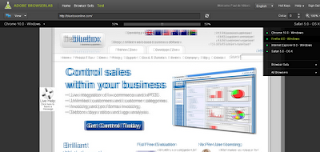
As a cross-browser developer I need an easy single source for testing my work on all the latest browsers. I searched around a bit and found Adobe BrowserLab to fit the bill.
I managed to get a free account, though I see from Adobe Forms that there will eventually be a charge of around $10-$20 per month for the service... still, having looked at a few of the competitors in this market, that is not a bad price.
Features include engines for all the latest browsers, a handy side-by-side viewer so that you can compare your development version next to the various other versions, and even cleverer was the onion-skin viewer which overlays the 2 verions to make spotting differences even easier.
I managed to get a free account, though I see from Adobe Forms that there will eventually be a charge of around $10-$20 per month for the service... still, having looked at a few of the competitors in this market, that is not a bad price.
Features include engines for all the latest browsers, a handy side-by-side viewer so that you can compare your development version next to the various other versions, and even cleverer was the onion-skin viewer which overlays the 2 verions to make spotting differences even easier.

Subscribe to:
Posts (Atom)